
Rainbird Screen Casting | Nanny screen casting strategy, teach you to easily play Apple TV!
Many people who have usedApple TVUsers will praise its smooth UI experience, which is not only pure and ad-free, but also has an excellent interactive experience, and with the Apple ecosystem, the whole experience takes a qualitative leap forward.
The following is brought to you by Xiaoyu Yan Apple TV domestic use strategy, followed by1001 TVsThe exclusive method of casting screen Oh ~
Apple TV Domestic Use Tips
I. Necessary preparation
If you want to watch 4K movies, videos, then
1. First you need a supportTrue 4K HDR for TV or monitorIt would be nice if HDR or Dolby Vision could be supported;
2. Then you need aHDMI 2.0 or 2.1 cable, version 2.1 supports higher resolution and dynamic HDR than version 2.0, connecting TVs and Apple TV;
3. preferably with aGigabit network cableIt is possible to maintain a more stable network environment, and if not, it doesn't matter, Apple TV has a built-in Wi-Fi module to connect to your home wireless network.
Apple TV can be simply understood as a TV box of Apple system, there are three interfaces on the body, which are power interface, HDMI interface, and network cable interface.
II. Function introduction
Next, we'll introduce you to the major app features of Apple TV.
01 Photos
Photo app can view photos in iCloud, and the [Memories] feature is great for viewing previous photos with family and friends, and watching them on the big TV screen will have a better feel.
02 AirPlay Overhead Casting
Photos or videos on your iPhone or iPad can be cast directly to Apple TV via AirPlay with excellent picture quality and smoothness and low latency.
03 Apple Store App Store
You can install some software and games, such as foreign streaming platform software and various games, and you can install overseas versions of Akiyon and Tencent Video.
However:
1) The content is not rich enough and the update is a bit behind;
2) The annual fee for vip membership is about 1 times higher than the domestic one.
Note: Apple Store function needs to log in the foreign region account Oh ~ Apple TV supports adding multiple accounts at the same time, and can easily switch accounts, and the software that has been downloaded after switching can still continue to use.
04 Apple Service Subscriptions
Note: The following functions need to log in to the outside account Oh ~
1) Apple TV+
Apple TV+ is Apple's own streaming platform, which features many exclusive premium series and movies in 4K quality, supports Dolby Vision and Dolby Atmos specifications, and generally supports multiple languages and subtitles.
Watch TV+ on Apple TV for a true TV streaming experience that's super smooth, high quality and ad-free.
2) Apple Music
You can also experience Apple Music on your big screen TV. Apple Music pages are very clean and immersive, and support spatial audio Dolby Atmos, and with HomePod, the experience is even better.
3) Apple Arcrade
Arcade is Apple's game subscription, which has a very large number of interesting Apple-exclusive games, probably the most abundant games in TV. It can be operated with the Siri Remote, or with an external joystick.
4) Apple Fitness+
Fitness+ is Apple's indoor fitness exercise service, which can be paired with Apple Watch to experience first-class fitness exercise, which has a very large number of fitness programs can follow the practice.
Seeing Apple TV so versatile, is it crazy exciting?
Next, I'll tell you another convenient and direct, simple and easy, one-step ultimate secret, which isRain Bird Screen Casting App!
If you have the Rainbird Screen Casting App, then all of the above is not a problem, whether you have an account in a foreign region, whether you can set up the network ..... As long as you haveRain Bird Screen Casting AppIn your hands, you can experienceApple TVThe ultimate screen casting experience!
Rainbird Screen Casting - Apple TV Screen Casting Tips
I,Apple phone cast screen to Apple TV
iPhone/iPad可使用Airplay直接投屏到Apple TV上,效果非常好,流畅稳定,延迟也很低。
Second, Android phone cast screen to Apple TV
The following is based onAndroid phonesAs an example, demonstrate the use ofRain Bird Screen Casting Mirroring Screen CastingSteps for Apple TV.
1. 在手机和Apple TV上安装并打开雨燕投屏
📥 Apple TV 版: 在App Store下载
📱 安卓版: 在应用市场下载
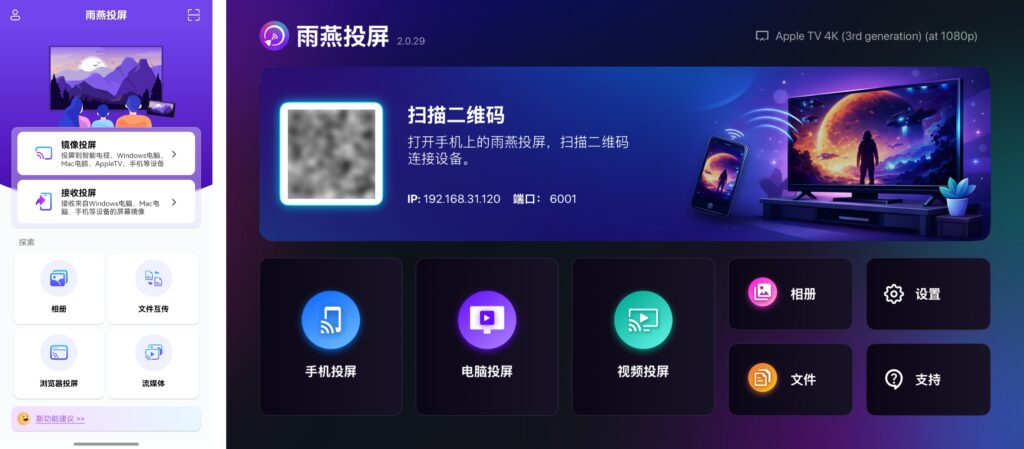
2. 确保手机和Apple TV连接到同一Wi-Fi(5G频段的Wi-Fi是最佳选择)
3. 开始配对
1) 扫描二维码
在手机上打开“雨燕投屏”APP,在主界面或“Mirroring Screen Casting”界面点击右上角”扫描“图标。
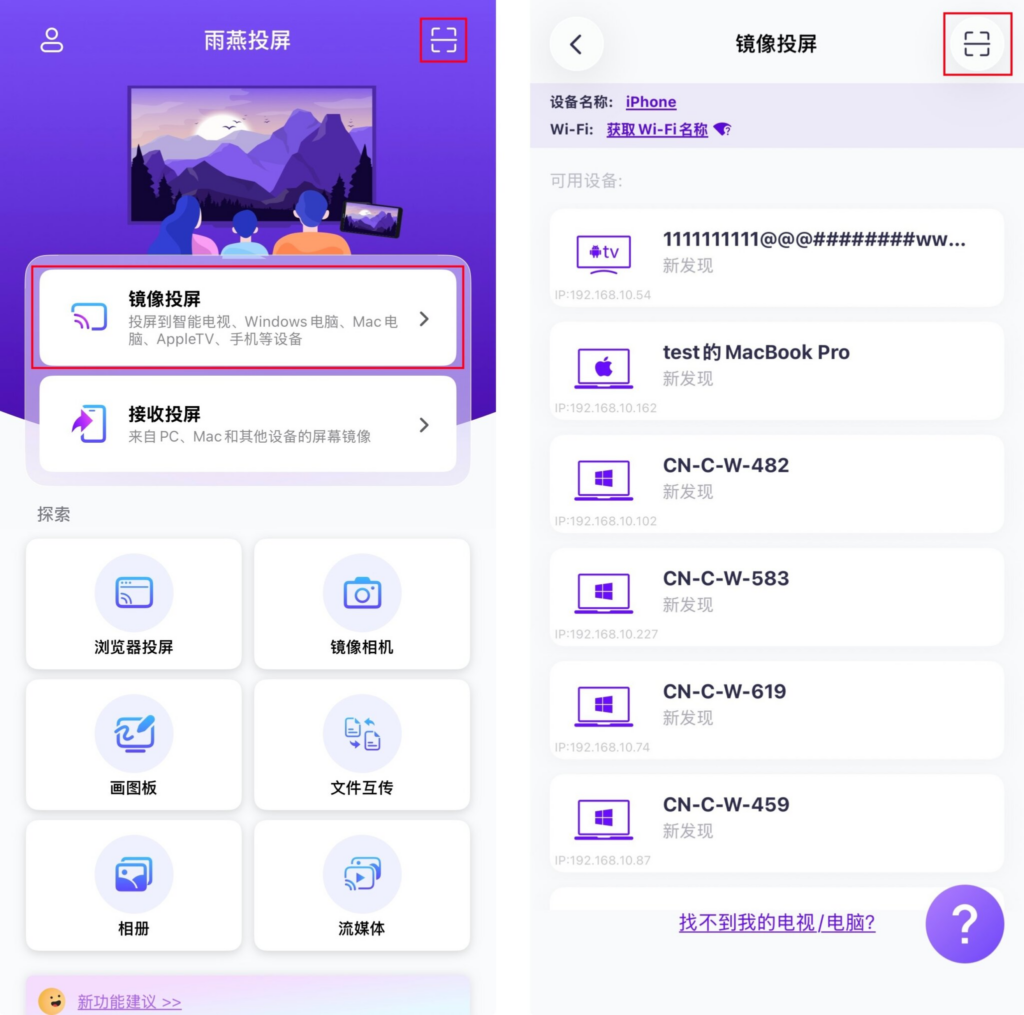
扫描Apple TV上显示的二维码。
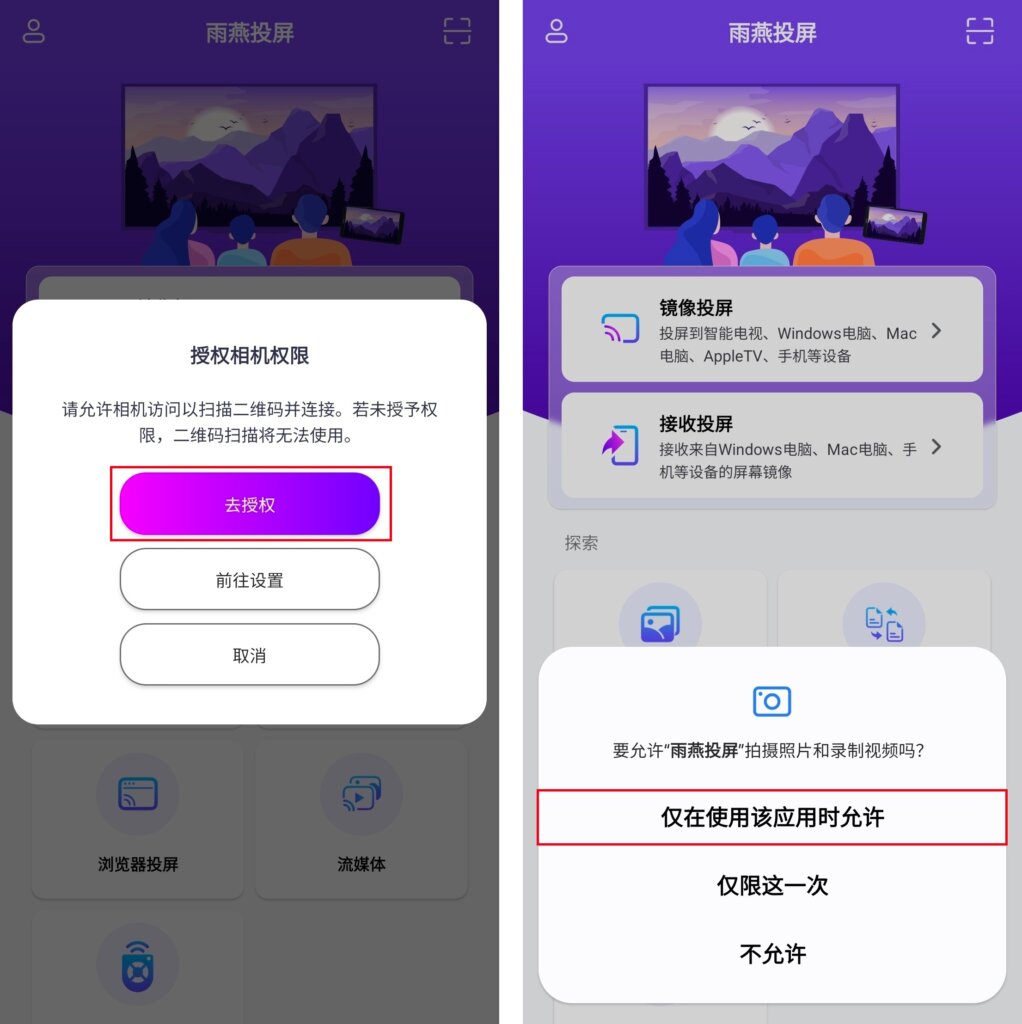
首次扫描需要授权相机权限。
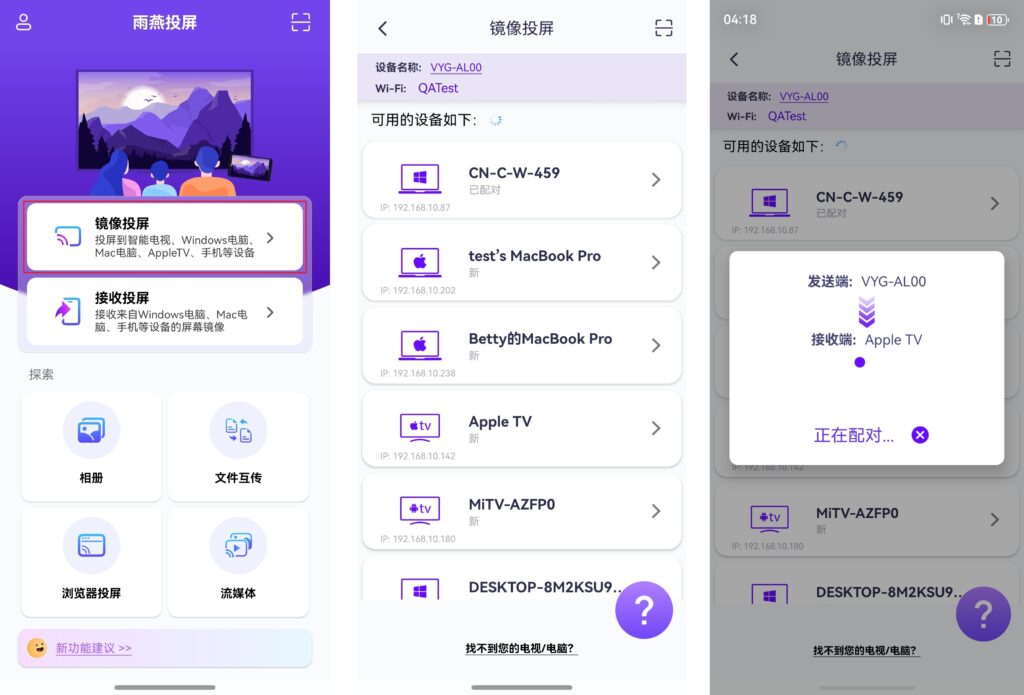
2) Select a nearby device
雨燕投屏会自动检测并显示同一局域网中所有支持投屏的设备(如智能电视、电视盒子或电脑)。
选择目标设备即可启动投屏。
注意:如果未显示目标设备,可以刷新重新加载。
在投屏前,您需要授予通知权限才能在通知栏中查看状态。
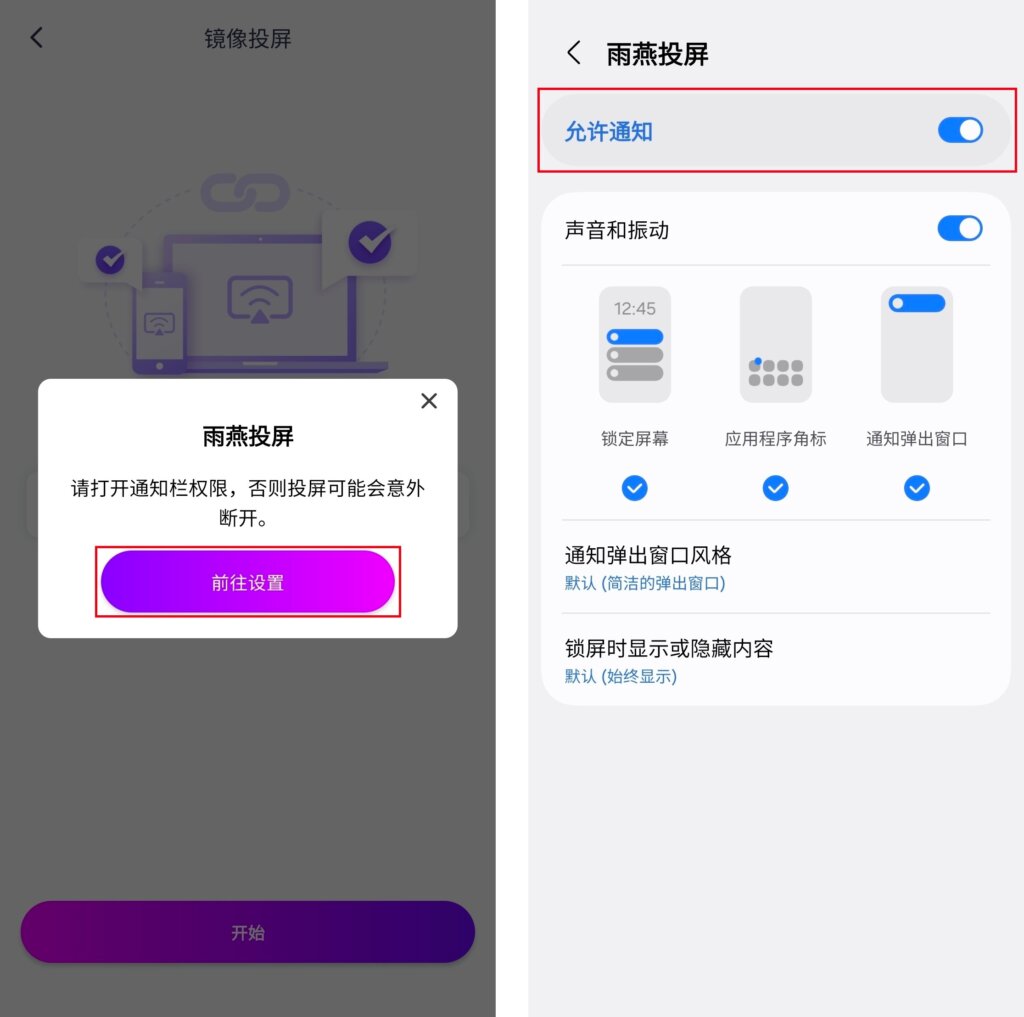
在Apple TV上点击“允许”

Ding~Cast successfully!
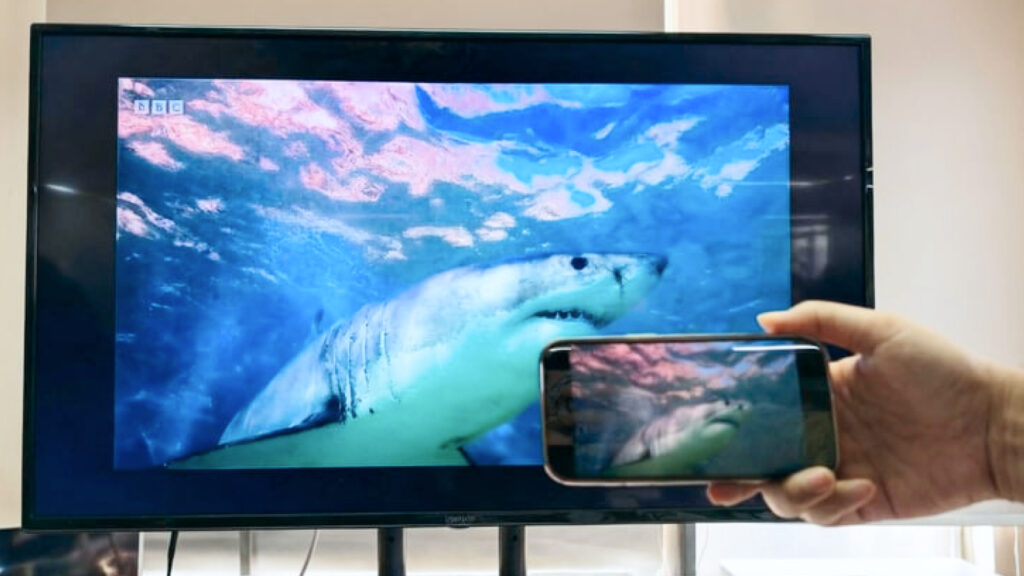
Whether it's an Apple phone or an Android phone, Rain Bird Screening Apple TV already supportsAudible Screen CastingOh!
AndStreaming Screen Casting功能,兼容多种媒体格式和电视,无论是Pictures, ,MusicorVideoAll can be easily cast to TV!
三、Windows电脑和Mac投屏到Apple TV
Windows computersandMacThe same can be cast to the TV via Apple TV.Windows Casting to Apple TVWhat's more1001 TVsThe best of the best!
As far as I know, there is no other screen casting software on the market with the function of casting Windows to Apple TV!
The following is an example of how to use a Windows computerRain Bird Screen Casting Mirroring Screen Castingto Apple TV.
1.在电脑和Apple TV上安装并打开雨燕投屏
📥 Apple TV 版: 在App Store下载
📥 Windows版: 点击下载安装包
📥 Mac版: 在App Store下载
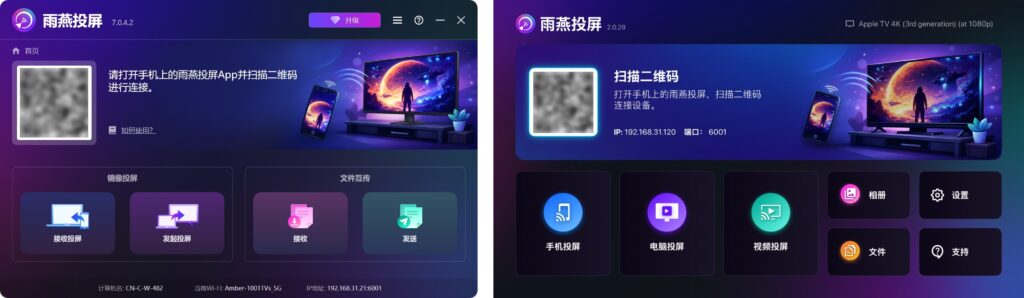
2.确保电脑和Apple TV连接到同一Wi-Fi(5G频段的Wi-Fi是最佳选择)
3.在电脑上点击“发起投屏”,在可用设备列表中选择您的Apple TV
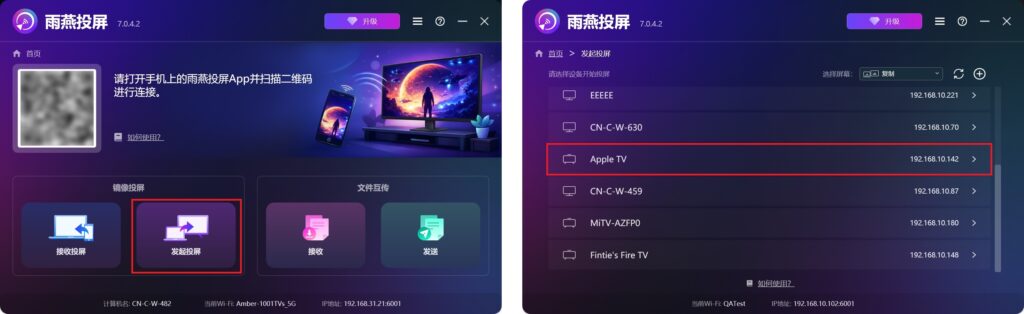
4.在Apple TV上点击“允许”
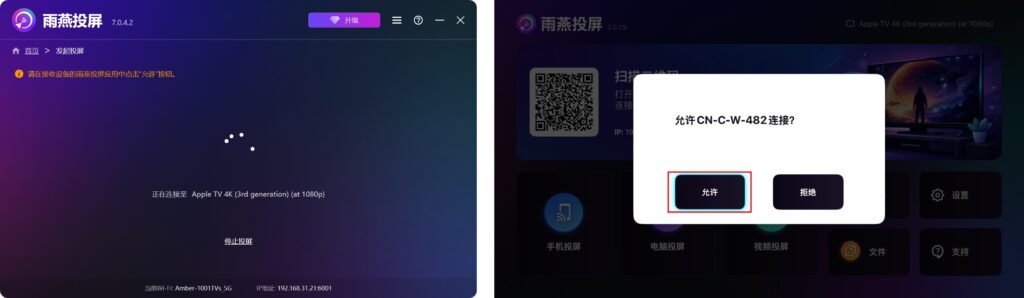
Ding~Cast successfully!
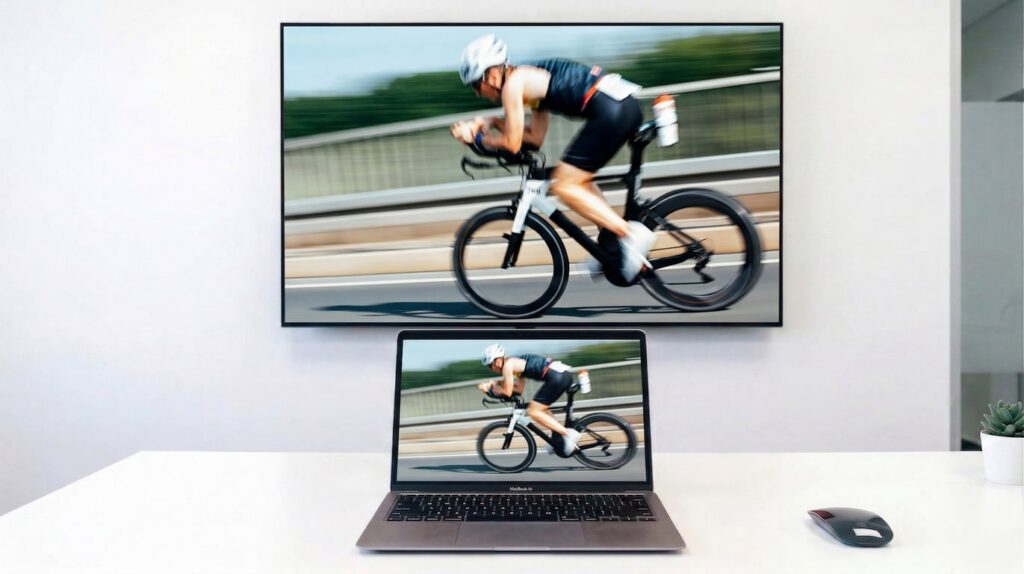
The above isRainbird Screen Casting with Apple TVThe use of the strategy of
Welcome home to experience! 🤗
点击 ”1001 TVs“ 立即下载APP吧!
📥 Apple TV 版: 在App Store下载
📥 Windows版: 点击下载安装包
📥 Mac版: 在App Store下载
📱 苹果版: 在App Store下载
📱 安卓版: 在应用市场下载